
Hospital Website Template vs Custom: What a 6-Page Hospital Site Needs
A hospital website template can be live in a week. A custom build takes longer and costs more. Which one is right depends less on design taste than on what the site has to carry: departments, consultants, emergency contact, appointments and patient data. This guide compares the two honestly and lays out the six pages every multi-specialty hospital website needs.
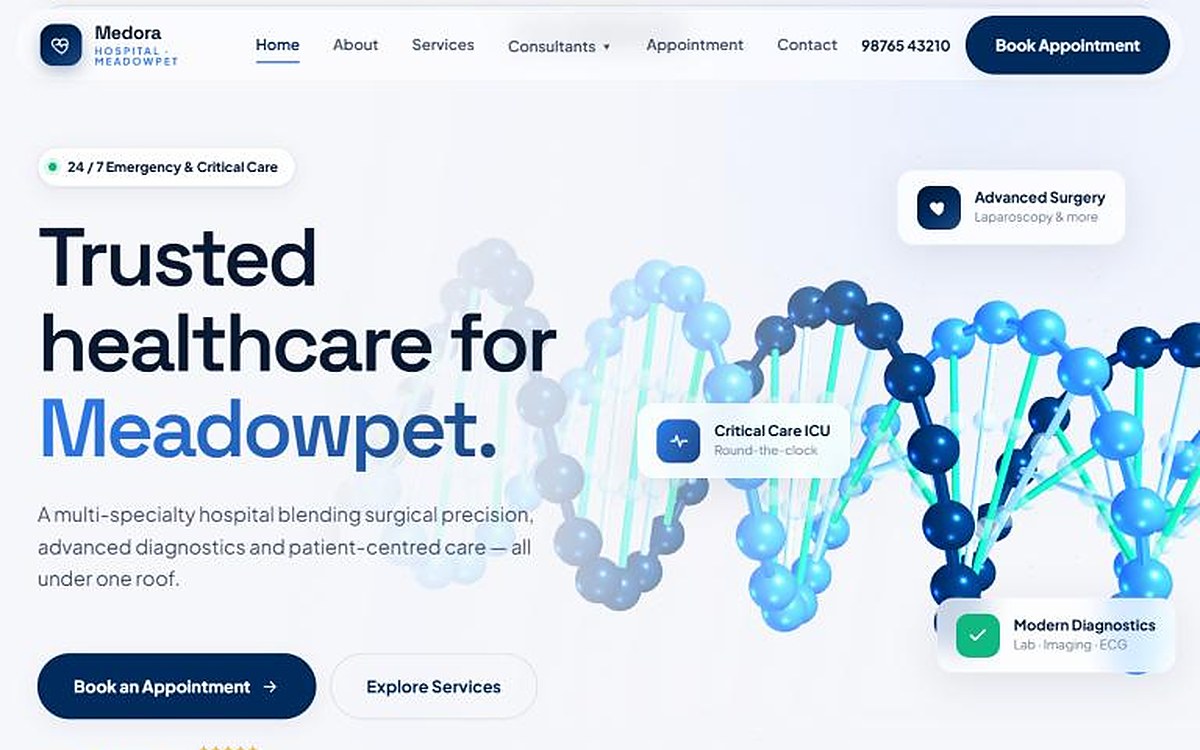
The short answer: a hospital website template is fine for a small nursing home that needs a simple, fast, low-cost presence. A multi-specialty hospital is usually better served by a custom build, or a template rebuilt so heavily that little of it remains, because the site has to organise many departments and consultants, show emergency contact on every page, take appointment requests that handle patient data properly, and load fast on a patient’s phone. Whichever you choose, the site needs six core pages: Home, About, Services or Departments, Consultants, Appointment and Contact.
What a hospital website template gives you, and what it doesn’t
A good template is a real shortcut. You get a finished layout, a working menu and a mobile version on day one, at a fraction of the cost of design and development from scratch. For a single-specialty nursing home with five doctors and one phone number, that can be enough.
The trouble starts when the hospital outgrows the template’s assumptions:
- Departments that don’t fit the boxes. Templates are built around a fixed number of service cards. Twelve departments, each with its own consultants, timings and facilities, rarely fit without hacks.
- Consultant directories. Full-time and visiting consultants, OP timings by day and qualifications per doctor are a data problem, not a design problem. Most templates leave you editing the same block twenty times.
- Speed. Multi-purpose templates load sliders, animations and plugins for features you never use. On a 4G phone outside the casualty entrance, those seconds matter.
- Looking like everyone else. Popular hospital themes are sold thousands of times. A patient comparing three hospitals may see the same layout three times.
- Patient data. An appointment form collects names, phone numbers and often symptoms. That data needs a clear consent notice and careful handling under India’s data protection law; see our DPDPA checklist for clinic websites. A template’s default contact form plugin was not built with that in mind.
Hospital website template vs custom: side by side
| Template | Custom build | |
|---|---|---|
| Time to launch | Days to a couple of weeks | Usually several weeks |
| Upfront cost | Lowest | Higher; depends on pages and features |
| Departments and consultants | Fixed layouts, manual repetition | Structured around how the hospital is organised |
| Speed on mobile | Often heavy unless trimmed | Built only with what is needed |
| Look and feel | Shared with other buyers of the theme | Unique to the hospital |
| Appointments and data | Generic form plugins | Designed with consent and storage in mind |
| Long-term changes | Limited by the theme | Grows with new departments |
For price ranges, our clinic website cost guide breaks down the three tiers; a multi-specialty hospital site with a department structure and consultant directory usually sits in the custom tier.
The 6 pages a hospital website needs
When we designed the Medora Hospital concept, we built it as six full pages. That is the minimum structure we recommend for a multi-specialty hospital website, whether it starts from a template or not. Good hospital website design starts from this structure, not from the colour palette.
1. Home
Answer the urgent questions first: the emergency number, 24/7 availability, location and a Book Appointment button, all visible before the first scroll. Then the main departments, one line on why patients trust the hospital, and the facilities. Our 7-second homepage test applies to hospitals even more than clinics.
2. About
The hospital’s story, leadership, bed strength, accreditations you actually hold and the values behind the care. Keep numbers real and current; patients and insurers check.
3. Services or Departments
One section per department: what it treats, key procedures, facilities and the consultants who lead it. This is the page search engines and patients use most, so give each department enough text to stand on its own.
4. Consultants
Separate full-time and visiting consultants. For each doctor: photo, name, qualifications, specialty, registration details where you choose to show them, and OP days and timings. This page builds more trust than any slogan.
5. Appointment
A short form (name, phone, department, preferred date) with a clear consent line, plus call and WhatsApp options for patients who would rather talk. If you are weighing WhatsApp against a proper booking system, read when clinics need a real booking system.
6. Contact
Emergency, reception and department numbers, the address with an embedded map, directions and parking, and the hours for OP, pharmacy and lab. Repeat the emergency number in the header or footer of every page.
How we built Medora
Medora Hospital is a concept site from our web portfolio: a fictional 60-bed multi-specialty hospital, designed to show what a hospital website can look like without a template. It opens with a 24/7 emergency banner and a call button, explains care through four pillars (specialised, critical, emergency and diagnostic care), and presents departments in a horizontal scroll, from Emergency & Critical Care to the Women’s Health and Diagnostic centres. Consultants are split into full-time and visiting, and every page ends with the same path to book or call. You can view all six pages in phone and desktop frames on the portfolio.
When a template is the right choice
A template is a sensible start when the budget is tight, the hospital is small, or you need something live quickly while a proper site is planned. If you go that way, choose carefully:
- Test the demo on your own phone over mobile data. If it feels slow, it will be slower with your content.
- Check that you can add doctors and departments without copying blocks by hand.
- Make sure the emergency number can sit in the header on every page.
- Replace the default contact form with one that shows a consent notice and stores data securely.
- Read the licence: what you may change, and whether updates are included.
- Plan your own photos. Stock images of smiling doctors are the fastest way to look like every other hospital.
We design hospital website design projects from our Chromepet studio as custom builds or as template rescues: keeping what works, rebuilding departments, consultants and appointments properly, and making the site fast on a patient’s phone. See the Medora, Lumea and Pearl concepts for three different design languages.
WhatsApp us with your hospital name and number of departments, and we’ll reply with a scope and quote within one working day.
Frequently asked questions
Is a hospital website template good enough?
For a small nursing home with a few doctors and one phone number, a well-chosen template can be enough. A multi-specialty hospital usually outgrows it: many departments, full-time and visiting consultants, emergency contact on every page and appointment requests that handle patient data need a structure built for the hospital.
How many pages does a hospital website need?
At least six: Home, About, Services or Departments, Consultants, Appointment and Contact. Larger hospitals add a page per department, health packages, insurance and TPA information, careers and a blog.
How much does a hospital website cost in India?
It depends on the number of departments, consultant profiles and features such as online appointments. Our clinic website cost guide sets out three tiers from about ₹15,000 to ₹5 lakh and above; a multi-specialty hospital site with a department structure and consultant directory usually falls in the custom tier.
What should a hospital website homepage show first?
The emergency number, 24/7 availability, location and a Book Appointment button, all visible before the first scroll on a phone. Then the main departments, why patients trust the hospital and the facilities.
Can a hospital website take appointments online?
Yes. A short appointment form with name, phone, department and preferred date works well, with call and WhatsApp options alongside. Because the form collects personal and often health-related data, show a clear consent notice and store the data securely.
Does a custom hospital website rank better on Google?
Not automatically. Rankings depend on speed, a clear page structure, useful text for each department and doctor, and correct technical setup. A custom build makes those easier to get right, while a heavy template often needs work to reach the same standard.